As machine learning practitioners we need to serve ML models and in 2026 FastAPI is the way to do this. In this post I’m discussing some best practices for deploying ML inference with FastAPI.
In case you’re not familiar, FastAPI is a python framework that enables creating HTTP API’s. The framework enables you to declare methods for each path you are serving. It’s built on top of other packages such as pydantic, starlette and OpenAPI which provide useful features.
Here’s our starter code for serving the ResNet-18 model. You can find the complete code in this repository.
def load_model():
    model = torch.hub.load(
        repo_or_dir="pytorch/vision",
        model="resnet18",
        weights="ResNet18_Weights.IMAGENET1K_V1",
    )
    model.eval()
    return model


app = FastAPI()


@app.post("/predict")
def predict(request: dict):
    image_url = request["image_url"]
    logger.info("Received image_url: %s", image_url)
    bio = build_bytes_io(image_url)
    model = load_model()
    model_input = transform_to_input(bio)
    output = model(model_input)
    logger.debug("Output shape: %s", output.shape)
    labels = fetch_labels()
    predicted_category = calculate_prediction(output, labels)
    return {"prediction": predicted_category}
So far we have declared the path /predict which serves POST requests. This receives an image URL and predicts the type of object shown in the given image, which is what the ResNet-18 model is trained to do.
Let’s talk about improvements we can make to this basic FastAPI application.
1. Lifespan
You might notice our predict function serving the /predict path is loading the model and also fetching labels for every request. Obviously this is suboptimal, and the FastAPI lifespan concept helps us address this. We can define a lifespan method which will load resources at application startup and remove those on shutdown. Lifespan is a feature of Starlette, which also provides an application state which we can use to store things like the model in memory.
Let’s add a lifespan method as below which stores the model and labels in the application state.
@asynccontextmanager
async def lifespan(app: FastAPI):
    app.state.model = load_model()
    app.state.labels = fetch_labels()
    logger.info("Started application, loaded model and labels")
    yield
    logger.info("Finished application")
In our lifespan method, everything that runs before the yield will run at application startup and everything after the yield will run at shutdown. It’s not strictly necessary to remove the model and label resources from memory because when the application shuts down the memory will be reclaimed, but it’s helpful for our tests. Adding this lifespan method also required fixing the existing tests to ensure that the TestClient can handle the lifespan method, see FastAPI doc on testing lifespan for more explanation of this.
2. Pydantic Model
FastAPI is built on the pydantic package which comes with several benefits. In our current application the request is processed as a dict and we don’t know if the image_url key is present or not. By using a pydtantic model we can validate the structure of the request and define a structure for the response. As an added benefit we can auto generate documentation describing the structure of those with the OpenAPI framework.
Here are our simple pydantic models for the request and response, each with one field.
class PredictionRequest(BaseModel):
    image_url: str

class PredictionResponse(BaseModel):
    prediction: str
Since validation is applied to the request we have more useful errors when the request is not formatted as expected. For example before we would get this generic message for request data missing the image_url field:
curl -s -X POST -H "Content-Type:application/json" localhost:8000/predict -d '{"blah": "blah"}'
Internal Server Error
Now if we send the same request and additionally use jq to format the response we receive this which clearly indicates the issue:
curl -s -X POST -H "Content-Type:application/json" localhost:8000/predict -d '{"blah": "blah"}' | jq
{
  "detail": [
    {
      "type": "missing",
      "loc": [
        "body",
        "image_url"
      ],
      "msg": "Field required",
      "input": {
        "blah": "blah"
      }
    }
  ]
}
If we go to the docs url (which is localhost:8000/docs if running locally) we can see the schema for our PredictionRequest along with schemas generated by FastAPI.
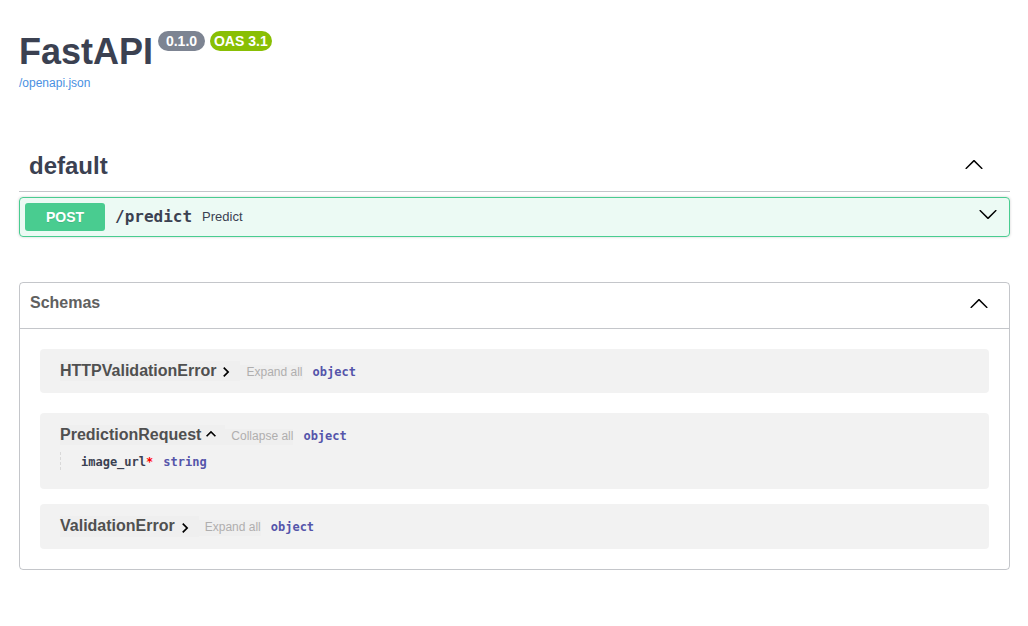
OpenAPI documentation of request schema
Additionally I amended the predict method to fetch app state from the FastAPI request instead of retrieving from the app object directly. Each request receives a shallow copy of the app state, which is a feature of Starlette.
3. Exception Handling
We already saw that FastAPI will now raise a RequestValidationError if the format of the request is incorrect since we added a pydantic model for the request. What about other errors though?
In this function below we are finding an image from a URL and returning the byte content of the image. The FastAPI approach to handling errors is to raise an HTTPException to the client. We can see there is already one for handling the situation where we get a non-200 response.
def build_bytes_io(image_url: str):
    response = requests.get(image_url)
    if response.status_code != 200 or not response.content:
        raise HTTPException(404, f"Unable to locate image at url {image_url}")
    img_bytes_io = BytesIO(response.content)
    return img_bytes_io
However this doesn’t give very clear errors in certain scenarios, for example if the requests package recognises the url as being invalid. If we send the request below, we will get an internal server error response.
curl -X POST -H "Content-Type:application/json" localhost:8000/predict -d '{"image_url": "blah.jpg"}'
Internal Server Error
Let’s add handling for a MissingSchemaException using FastAPI’s HTTPException class and we now get back a more useful response.
curl -X POST -H "Content-Type:application/json" localhost:8000/predict -d '{"image_url": "blah.jpg"}'
{"detail":"Image url missing schema: Invalid URL 'blah.jpg': No scheme supplied. Perhaps you meant https://blah.jpg?"}
However, if we now send a request with a valid URL schema but an invalid URL we still get an unhelpful response. Let’s add handling for a ConnectionError
curl -X POST -H "Content-Type:application/json" localhost:8000/predict -d '{"image_url": "https://blah.jpg"}'
Internal Server Error
Now we also get a more useful response outlining the specific issue
curl -X POST -H "Content-Type:application/json" localhost:8000/predict -d '{"image_url": "https://blah.jpg"}'
{"detail":"Image url caused connection error: HTTPSConnectionPool(host='blah.jpg', port=443): Max retries exceeded with url: / (Caused by NameResolutionError(\"HTTPSConnection(host='blah.jpg', port=443): Failed to resolve 'blah.jpg' ([Errno -2] Name or service not known)\"))"}
Here’s how our function looks after adding error handling for those two cases, so we are now raising three different HTTPException errors which we can customise such that the client sees a helpful and relevant error message.
def build_bytes_io(image_url: str):
    try:
        response = requests.get(image_url)
    except MissingSchema as ms:
        raise HTTPException(
            400,
            f"Image url caused missing schema error: {ms}",
        )
    except ConnectionError as ce:
        raise HTTPException(
            404,
            f"Image url caused connection error: {ce}",
        )
    if response.status_code != 200 or not response.content:
        raise HTTPException(404, f"Unable to locate image at url {image_url}")
    img_bytes_io = BytesIO(response.content)
    return img_bytes_io
4. Health Check
Finally, let’s add a path to support a health check. It’s going handle a GET request and return an HTTP 200 response when the container is available to respond to requests. When we deploy our container we’re going to be running it in a kubernetes cluster or on a managed service such as GCP Agent Platform or AWS Sagemaker. Those managed services will expect your container to support a health check.
Our health path is quite simple, returning an HTTP 200 with the content ‘ok’
@app.get("/health")
def health():
    return Response(content="ok", status_code=200)
We get the ok response back when sending a local request like below.
curl -X GET localhost:8000/health
ok
If you’re running your container on kubernetes you can configure a livenessProbe, which is a similar concept. This will help the cluster understand if the container is available to serve requests. You can also add a readinessProbe which handles the situation where the container needs some time to start up, for example when loading data or an ML model.
livenessProbe:
  httpGet:
    path: /healthz
    port: 8080
  failureThreshold: 1
  periodSeconds: 10
Updated Code
Here’s how our app.py code looks after implementing those changes.
def load_model():
    model = torch.hub.load(
        repo_or_dir="pytorch/vision",
        model="resnet18",
        weights="ResNet18_Weights.IMAGENET1K_V1",
    )
    model.eval()
    return model


@asynccontextmanager
async def lifespan(app: FastAPI):
    app.state.model = load_model()
    app.state.labels = fetch_labels()
    logger.info("Started application, loaded model and labels")
    yield
    app.state.model = None
    app.state.labels = None
    logger.info("Finished application")


app = FastAPI(lifespan=lifespan)


class PredictionRequest(BaseModel):
    image_url: str


class PredictionResponse(BaseModel):
    prediction: str


@app.post("/predict")
def predict(request: PredictionRequest, fast_api_request: Request):
    image_url = request.image_url
    logger.info("Received image_url: %s", image_url)
    bio = build_bytes_io(image_url)
    model = fast_api_request.app.state.model
    model_input = transform_to_input(bio)
    output = model(model_input)
    logger.debug("Output shape: %s", output.shape)
    labels = fast_api_request.app.state.labels
    predicted_category = calculate_prediction(output, labels)
    return PredictionResponse(prediction=predicted_category)


@app.get("/health")
def health():
    return Response(content="ok", status_code=200)
Conclusion
To summarise the changes we made:
-
We saw that a lifespan method is a good way to load a model at startup and prevent this overhead for each request. Furthermore, we saw that we can store resources loaded at startup in the Starlette app state.
-
Having a pydantic model helps our app in several aspects, adding request validation and automated OpenAPI docs. It’s also clearer for other developers to see the expected structures used in our application.
-
Raising an
HTTPExceptionwhere relevant will help clients calling our application and also make the expectations clearer for other developers. -
A health check or liveness probe is useful for the system managing our container and also can be useful for other developers. It might be useful to log requests being accepted and processed on this path for observability purposes.
Our inference container runs with lower latency, clearer data structures, better error handling and is able to support the paths expected by the systems running it. It’s going to be easier to deploy and and manage wherever you need to deploy your machine learning system.
That’s all for now. Happy inference!